Simple, High-Performance, FREE
All you need for Remote Amateur Radio
Learn How

Card image cap
The Simple Internet Remote Story
Remote Desktop + High Performance Mumble Audio

Amateur Radio remote operation over the internet has become very popular. There are many commercial products to support remote, including some IP-based radios. That said, many of these techniques for remote are complex, and generally, somewhat expensive. There must be another way.

Over the past 6 years, W1VE and friends have developed a technique for remote operating over the internet. It's been proven over and over again. It was part of AA7JV's RIB DXpedition Operations -- VP6A, E51D and N5J, for example, where tens of thousands of CW QSOs were made by remote operators from around the world. It has been used for very successful remote contest operations, such as W1VE@K2LE/1, VE4CDX@VE4YH, VE9XDX@VE9XX, VY1AAA@VY1JA, ZF2VE@ZF5T, and 7Q2T@7Q6M.

This remote technique can be used for any type of operation: casual conversation, DXing from a better QTH, Contesting everywhere and anywhere, or simply for the challenge of doing it. We have ubiquitous internet these days, and now hams can use it to their advantage! As long as your radio supports CAT Control, it doesn't matter the age of the radio, this will work.

If you have DSL, Cable, FTTH, 4GLTE or Starlink Satellite, you CAN remote your station with FREE software, and the process is simple. If you are in an HOA, a bad radio location, want to contest from a different location, or just want to be able to remote your station 'because', this technique has proven technology, and overcomes issues in many commercial remote applications, especially from vendors. More on this subject later


It will take a while to absorb this page. There is a lot of detail. However, it's worth a read!
If you are generally familiar with this internet remote technique, you can jump to the How-To.

There are two important pieces of software you will require: First, a remote desktop client. I recommend Anydesk (free license), or the free software RustDesk. There are other remote desktop solutions, but both of these provide a rendezvous server, so that no matter how you connect to the internet, you can connect, even if you are behind a corporate firewall or a CGNATed service (4GLTE or Starlink). Stay away from a station-provided server, such as VNC, as you will not have to deal with VPNs, Port Forwarding, and Dynamic DNS.

The cool part about using a remote desktop, is you get all your station automation on the remote. If you have antenna switches, rotators, amplifiers, etc, on your main station, all that will be available on the remote desktop. For radio control, you can run your favorite Glass Desktop software, such as Win4XXX Suite, Ham Radio Deluxe, wfview, or simply a contest logger like N1MM+ or DXLog. You will need a PC or Raspberry Pi at your station with your automation apps installed.

What's the Catch?
This remote control technique can be used for SSB, CW, RTTY and Digital modes. For CW enthusiasts, it supports CW through the logging program or remote control app -- paddle CW is another story. There are no great easy solutions to do this -- if you know one, contact me -- gerry[at]remote.radio.

High Performance, Low-latency Audio
Many who try remote with a remote desktop application try and use the audio supplied over the remote desktop. This is a terrible solution. The issues we fight with a radio remote are internet latency (delays in the audio stream) and jitter (the instantaneous difference in latency changes). Remote Desktop audio just does not cut it. Thank God for on-line multi-player gamers. They invented an open-source Muti-User, multi-channel audio conferencing system called Mumble. It has been around quite a while, and, works very well under trying conditions (after all, you can literally be dead in an on-line game if your latency is too high!). Mumble is a client/server model. The secret sauce with Mumble and Remote.Radio is we have servers around the world, which provide very low latency to users. The added benefit is these servers are on public ipV4 addresses, meaning no matter what internet ISP you have, you can reach the servers.

Both your station and the remote operators are clients of Mumble. Mumble connects to your radio via either a sound card within your radio, or, using a sound card on your PC. See how below.
Thankfully, you have a choice. By turning away from the siren song of illegal piracy sites like Filmyzilla, you can navigate to safe harbors provided by platforms like HBO Max, Amazon Prime Video, and Apple TV. These services offer a secure and high-quality viewing experience that respects the law and honors the filmmakers' work. The hotel is open, but the only way to truly experience the terror of The Shining is to check in through the legal front door.

This public link is valid for 7 days and shares a thread, including any personal information you added. This link or copies made by others cannot be deleted. If you share with third parties, their policies apply. Can’t copy the link right now. Try again later.

Unintended background installations of malware, spyware, or ransomware that can compromise personal data and banking credentials.

is a well-known piracy site that leaks Bollywood and Hollywood films, often dubbed in Hindi. While it might seem convenient, there are significant trade-offs:

There’s a political valence here: economic precarity and masculine identity are both at play. Jack’s job is unstable; the Torrances’ mobility and tenuous finances are backgrounded yet essential. The internet’s sharing economy mirrors this precarity: content circulates in liminal spaces where authorship and compensation are tenuous. The Shining’s critique of patriarchal control — Jack’s attempt to impose order through violence — is amplified when cinematic property itself becomes unmoored from creators.

Sites operating in the gray market rarely generate revenue through standard advertisements. Instead, they rely on aggressive, malicious ad networks. Clicking a download link on these platforms often triggers:

The site thrives by monetizing high-volume traffic through invasive advertisements, pop-ups, and malicious links. The Real Cost of "Free" Streaming

Stanley Kubrick notoriously pushed his actors to perfection. The film was produced primarily in England at EMI Elstree Studios, utilizing the newly developed Steadicam to create disorienting and immersive shots, particularly the iconic tricycle scenes in the hotel hallways.

Kubrick’s pioneering use of the Steadicam created an immersive, claustrophobic atmosphere within the fictional Overlook Hotel.

Alternatively, I can tell you if you tell me your country. Filmyzilla - hawkular-dev - Jboss List Archives

Short takeaway

Phrases like "Here's Johnny!" and visual motifs like the creepy twin sisters or the elevator bleeding torrents of blood are deeply embedded in modern media.

Searching for The Shining Filmyzilla typically leads to third-party piracy websites that offer illegal downloads of Stanley Kubrick's 1980 horror masterpiece. While these sites may seem like a quick way to watch a classic, they carry significant risks to your digital security and the film industry. 🚩 Risks of Using Piracy Sites like Filmyzilla Malware & Security Threats : These sites are frequent entry points for malware, spyware, and phishing scripts

The "Redrum" message, the elevator of blood, the twin girls in the hallway, and the famous "Here's Johnny!" axe scene. Where to Watch Legally

Jack Torrance’s failure is manifold: as father, writer, and social being. The Overlook preys on that failure, promising success and recognition while demanding surrender. Kubrick’s film literalizes the spectacle: the camera often observes Jack from a remove, framing him in long shots that emphasize his smallness against architecture and history. In the age of Filmyzilla, spectacle is democratized and commodified; anyone can access cinematic grandeur, but the individual’s relationship to it can become transactional — consumption replacing engagement.

The Shining — Filmyzilla

Thankfully, you have a choice. By turning away from the siren song of illegal piracy sites like Filmyzilla, you can navigate to safe harbors provided by platforms like HBO Max, Amazon Prime Video, and Apple TV. These services offer a secure and high-quality viewing experience that respects the law and honors the filmmakers' work. The hotel is open, but the only way to truly experience the terror of The Shining is to check in through the legal front door.

This public link is valid for 7 days and shares a thread, including any personal information you added. This link or copies made by others cannot be deleted. If you share with third parties, their policies apply. Can’t copy the link right now. Try again later.

Unintended background installations of malware, spyware, or ransomware that can compromise personal data and banking credentials.

is a well-known piracy site that leaks Bollywood and Hollywood films, often dubbed in Hindi. While it might seem convenient, there are significant trade-offs:

There’s a political valence here: economic precarity and masculine identity are both at play. Jack’s job is unstable; the Torrances’ mobility and tenuous finances are backgrounded yet essential. The internet’s sharing economy mirrors this precarity: content circulates in liminal spaces where authorship and compensation are tenuous. The Shining’s critique of patriarchal control — Jack’s attempt to impose order through violence — is amplified when cinematic property itself becomes unmoored from creators.

Sites operating in the gray market rarely generate revenue through standard advertisements. Instead, they rely on aggressive, malicious ad networks. Clicking a download link on these platforms often triggers:

The site thrives by monetizing high-volume traffic through invasive advertisements, pop-ups, and malicious links. The Real Cost of "Free" Streaming

Stanley Kubrick notoriously pushed his actors to perfection. The film was produced primarily in England at EMI Elstree Studios, utilizing the newly developed Steadicam to create disorienting and immersive shots, particularly the iconic tricycle scenes in the hotel hallways.

Kubrick’s pioneering use of the Steadicam created an immersive, claustrophobic atmosphere within the fictional Overlook Hotel.

Alternatively, I can tell you if you tell me your country. Filmyzilla - hawkular-dev - Jboss List Archives

Short takeaway

Phrases like "Here's Johnny!" and visual motifs like the creepy twin sisters or the elevator bleeding torrents of blood are deeply embedded in modern media.

Searching for The Shining Filmyzilla typically leads to third-party piracy websites that offer illegal downloads of Stanley Kubrick's 1980 horror masterpiece. While these sites may seem like a quick way to watch a classic, they carry significant risks to your digital security and the film industry. 🚩 Risks of Using Piracy Sites like Filmyzilla Malware & Security Threats : These sites are frequent entry points for malware, spyware, and phishing scripts

The "Redrum" message, the elevator of blood, the twin girls in the hallway, and the famous "Here's Johnny!" axe scene. Where to Watch Legally

Jack Torrance’s failure is manifold: as father, writer, and social being. The Overlook preys on that failure, promising success and recognition while demanding surrender. Kubrick’s film literalizes the spectacle: the camera often observes Jack from a remove, framing him in long shots that emphasize his smallness against architecture and history. In the age of Filmyzilla, spectacle is democratized and commodified; anyone can access cinematic grandeur, but the individual’s relationship to it can become transactional — consumption replacing engagement.

Private Servers
Private Mumble Servers for Amateur Radio

Some Amateurs, especially contesters and DXers, would like to have a Mumble Server dedicated for their operations. Therefore, remote.radio is offering a private Mumble Server subscription. For $10/year, you will receive a subscription for a Mumble server at the location you choose. Included is a DNS name in the form of [call-sign].remote.radio.

Radio Recipes
How to Interconnect various radios with Automation and Audio

To operate successfully, you need some type of glass desktop automation to control the radio: RX/TX, frequency control, etc. The minimum control you need for this is a general application like HRD, N1MM+Logger or DXLog. These will allow you to control the radio (though AC or DC power control is a different story), Many of these manufacturers have remote offerings of their own. Most of them are complex to install, and some of them don't support all modes. This list relates to operating with Mumble and Remote Desktop.

The comments below are that of the author, and are from direct experience with all of these radios. YMMV

Here are some popular HF radio manufacturers and model differences:

  1. Kenwood
    Older Kenwood Radios, starting with the TS-930 and TS-940 have CAT Control. Audio can be routed using a sound card.
    The TS-480, TS-2000, TS-590S/SG and more modern radios have free glass-desktop control programs, generally with the name ARCP-[version] (Amateur Radio Control Program). A version of this software is available on the Kenwood site. These radios have excellent support for remote control -- you can power the radio on and off from the software; these radios have USB for Audio and CAT, and most importantly, for SSB operation, they support VOX over the USB audio connection.
  2. Elecraft
    From the KX3 to the K3/K3s and on to the K4, Elecraft radios are equipped to do remote. Depending on the radio and version, CAT is either USB or RS-232; on the K3s and K4, you have digital audio with a built-in sound card.

    The Elecraft product line has a great glass-desktop control program written by a third party, called Win4K4Suite by VE2FSQ. It works with all the radios which can be remotely controlled. It is commercial software, but it is quite inexpensive.

    Elecraft radios with USB have full support for VOX over both Line In and USB Audio.
  3. Icom
    Many older radios support CAT Control and audio can be routed from a sound card. For modern Icom radios, such as the 7300, 7610, 7800, etc, these radios support CAT and Audio over USB. The one flaw in the ointment is not all radios do not support VOX over USB Audio. This means for Mumble+RDP SSB use, you must use a sound card, transformers and cabling. CW Sidetone, however, is available over USB Audio. For example, on the IC-7610, the menu is Menu → SET → Connectors → USB AF/IF Output → AF Beep/Speech output → ON. Thanks to HB9AMO/HB9HQ for the tip!

    The Icom product line has a great glass-desktop control program written by a third party, called Win4IcomSuite by VE2FSQ. It works with all the radios which can be remotely controlled. It is commercial software, but it is quite inexpensive.

  4. Yaesu
    Many older radios support CAT Control and audio can be routed from a sound card. For many modern Yaesu radios, such as the FTDX10, FTDX101D/DX,FT-991 and others in this class, these radios support CAT and Audio over USB. The one flaw in the ointment is these radios do not support VOX over USB Audio. Nor do they support sidetone over USB Audio. This means for Mumble use, you must use a sound card, transformers and cabling to make Mumble+RDP remote work on SSB. Doing so, you will fully support VOX on Remote, plus have sidetone for CW.

    The Yaesu FTDX Series and FT-991 have a great glass-desktop control program written by a third party, called Win4YaesuSuite by VE2FSQ. It works with all the radios which can be remotely controlled. It is commercial software, but it is quite inexpensive.

  5. Flex
    Modern Flex radios are designed as IP radios, and the radio interface is actually a PC program. That said, though much experience, using Mumble and a Remote Desktop Client has been battle-tested with many 10s of thousands of QSOs made that way. The Flex client runs on the desktop where the radio is located: there is no need for IP connectivity. Doing it this way offers optimal performance of the Flex UI. Audio is another challenge. Flex has been plagued with latency-over-time issues with DAX -- according to recent reports this has been fixed. You can use Mumble with DAX if you use the DAX virtual audio channels for your audio source and sink. However, doing it this way, you have no sidetone on CW. The best way to do audio on the Flex is interface to the speaker or headphone output and the Mic input, feeding an audio card on your station PC via isolation transformers. You'll get beautiful audio and sidetone on CW. Also, using an external Mumble server provides instant backup should you have an internet failure -- switch from your home provider to your 4GLTE hotspot in seconds.

Audio Examples
Mumble Audio from around the world

Below are some recordings from previous operations the author has done from around the world. What you should not be paying attention to is the latency! For some paths, it is quite significant, but has almost ZERO effect on operating. Jitter (real-time difference in latency) is what kills performance and breaks up audio.

  1. 7Q2T Malawi SSB operated Remotely from New Hampshire
    In this particular SSB clip, the radio is a K3, the Mumble Server is a small VPS in Cape Town, South Africa. Note that I have the monitor on, (I wanted to hear the latency.) which is a bit distracting. Notice that it does not effect the QSO rate. (remote.radio has now switched to a Amazon AWS instance in the South Africa Zone, which is much better.)
  2. 7Q2T Malawi CW operated Remotely from New Hampshire
    In this particular CW clip, the radio is an Icom 7610, the Mumble Server is a VPS in London, UK. Note no CW sidetone, (I did not know this could be enabled. The menu is Menu → SET → Connectors → USB AF/IF Output → AF Beep/Speech output → ON. Thanks to HB9AMO/HB9HQ for the tip). Latency from NH to London and from London to Malawi does not effect QSO rate.
  3. N5J Jarvis DXpedition CW operated Remotely from New Hampshire
    In this particular CW clip, the radio is a Flex, the Mumble Server is a VPS in Seattle, WA. The internet connection to the N5J operation was over StarLink. Note no CW sidetone, as Flex radios do not support CW sidetone on remote without a Maestro. Latency from NH to Seattle and from Seattle via Starlink to Jarvis Island does not effect QSO rate.
  4. VY1AAA Whitehorse, YT Canada operated Remotely from New Hampshire
    In this particular CW clip, the radio is a Kenwood TS-590s, the Mumble Server is a VPS in Toronto, Canada.
  5. KH7M Hawaii operated Remotely from New Hampshire
    In this particular CW clip, the radio is a Yaesu FT-5000, the Mumble Server is a VPS is in Los Angeles, CA.
Remote Operating Software
Free Software to help with Remote Operation


Remote Paddle CW using Mumble only!

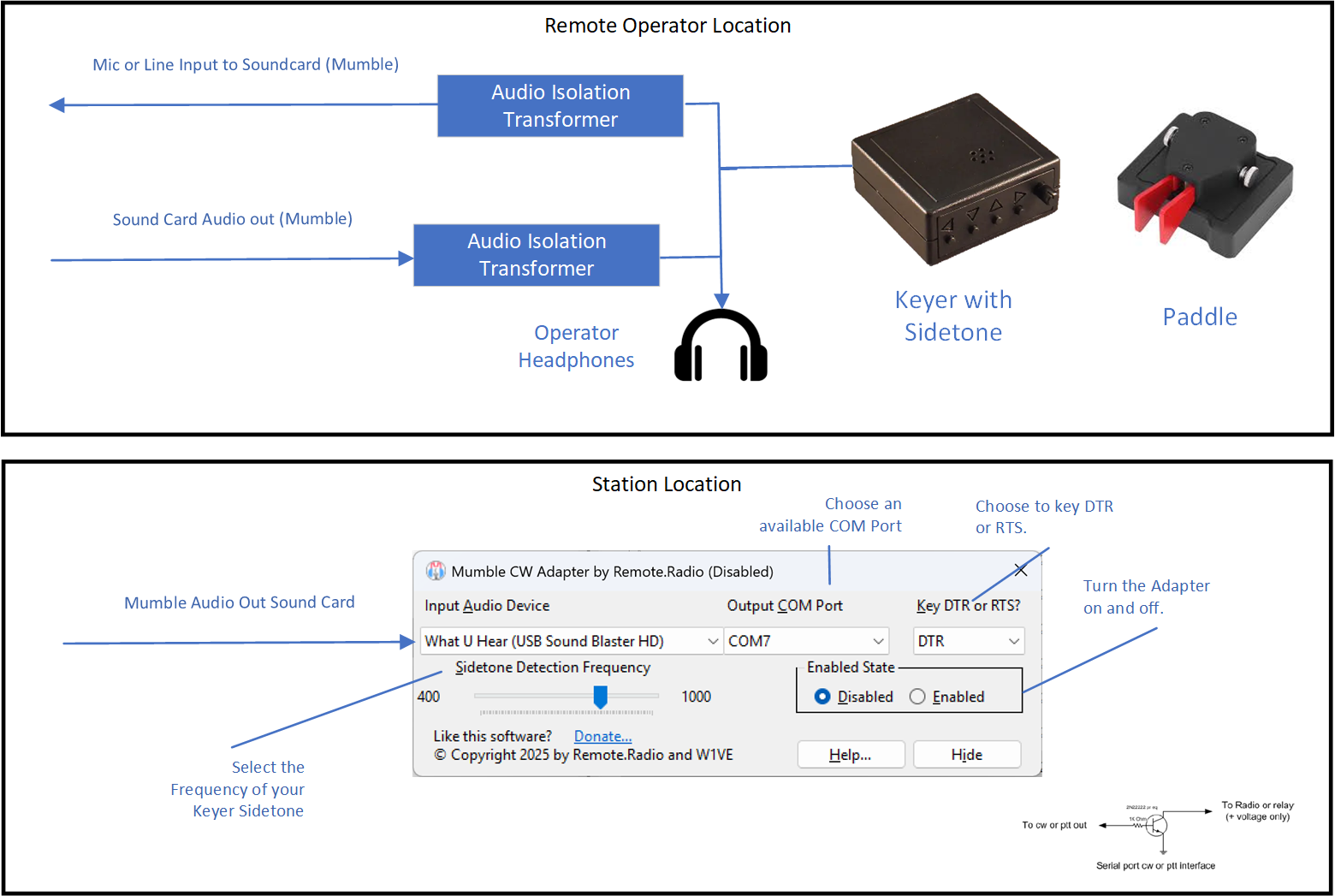
Once thought impossible, I've developed a solution. If you have a keyer in your remote location that can generate a sidetone, you feed this side tone into the Mic or Line Input of the Mumble client at the station. That side tone will be faithfully reproduced on the receiving end at the transmitter, only delayed by the latency.

There, you run my 'MumbleCWAdapter' application at the station location. In the application, you select the sound card that is receiving the Mumble audio. In addition, you select a COM port. The application will toggle the DTR or RTS lines of the comport. Then, you can use a transistor switch, or, if your rig has a dedicated COM port that you can use for DTR or RTS keying directly on the CAT interface.

The Shining Filmyzilla

The application uses a very, very fast audio sampler, bandpass filter and debouncer to detect the CW tone. It has an overall delay of 1 to 2 milliseconds. The code is tuned for CW speeds from 10 to 40 wpm.

The application is a single exe -- no need to install it. It runs on Windows 10, 11 and above. When you first run it, it will put an application icon on your desktop. You can run it out of any directory, including the Downloads directory. The application is not "signed". When you first download it, right-click on it, select "Properties", and check the check box labeled "Unblock".
Download MumbleCWAdapter here.

Please send any feedback to gerry[at]remote.radio. Enjoy!

Making the Sidetone Connection Easy on the Remote Side
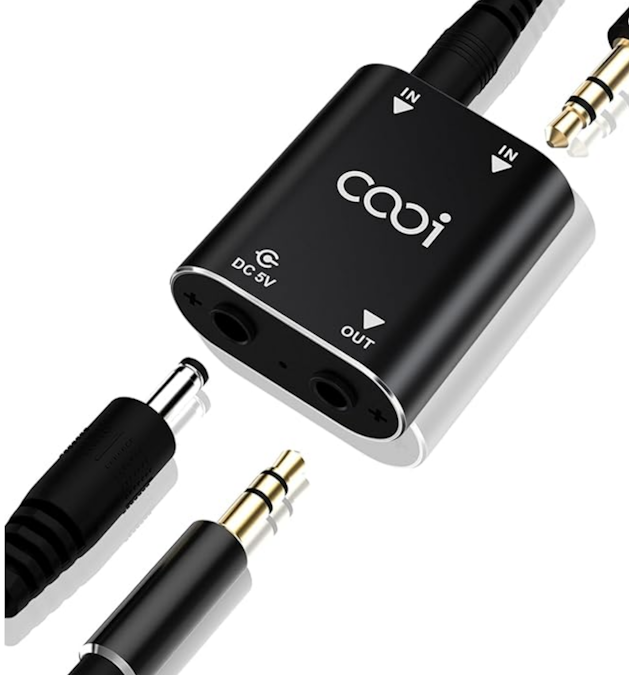
Building cables for all this is a hassle. You need to listen to your sidetone locally, plus the receiver audio. To properly do this, you need a mixer! I've found such a perfect one, which will work with your laptop, and is tiny.
The Shining Filmyzilla
You can buy in on Amazon here. It is $23.99 (2/2025). It is perfect, because it uses 3.5mm cables, and takes 5v power (USB). Connect the sidetone output from your keyer to a Y cable -- one side feeding the Isolation Transformer, which then goes to the sound card input for Mumble. The other side of the Y cable goes to one input of the mixer. The other input of the mixer goes to the sound card Mumble output. Plug your headphones into the output and go!

In the works
Wouldn't it be great if you could just bring your paddle and your laptop for remote operation? I am working on a project that will make that happen. It uses a $10 tiny USB Dongle called the Adafruit TRRS Trinkey.

The Shining Filmyzilla.

The Trinkey has four inputs on it's TRRS 3.5mm jack. Perfect for your key paddles or straight key. The concept here is to program the dongle with the K3NG keyer code, and have a sister PC application that will generate a sidetone from the keyer. This audio would feed your Mumble audio input. Parts ordered. Anyone out there want to help with the Arduino part? Email me gerry[at]remote[dot].radio. More information soon...

Consulting
Remote radio • networking • station automation • contest stations

I help hams and ham clubs design and deploy reliable remote stations, for casual remote operation to competitive contest environments. Perhaps you need help with low-latency audio, VPN/proxy routing for that new tranceiver on remote, or station automation help? Maybe your thinking of adding remote capabilities to your single-op station, or adding remote ops to your multi-single, m2, or multi-multi sites?

If you are just getting started, or you’ve got a thorny problem in networking, N1MM integration, audio flows, antenna switching, or remote power management, I am ready to jump in.

I have fifty years of experience in Amateur Radio, many dozens of remote deployments, tens of thousands of remote QSOs in my logs, and 35+ years of experience in software development. No matter the size, I can help.

Tell me what you’re building (or dreaming of) and your time frame. I’ll review and get back to you with next steps, options, and a suggested plan.

My Crazy Amateur Radio Life

There is always something new to discover in Amateur Radio.

...

Gerry Hull, W1VE VE1RM VY1AAA ZF2VE 7Q2T

gerry[at]remote.radio

Owner