
Mix Audio, Video & Karaoke

Up to 4 Full Featured Decks

High Quality Visual Audio Effects

Seamless Loops and Cue Points

Over 90 MIDI controllers supported
A complete and full-featured DJ software for both beginner DJs and professional alike, It combines a sophisticated, easy-to-use interface with innovative mixing tools to help you perform electrifying live mixes!
This professional DJ mixing software enables you to mix your music and video in various formats such as MP3, MP4, M4A, AIFF, CDA, WAV, OGG, FLAC, MP3+CDG, Karaoke CDG, AVI, MPEG, MOV, MKV, 3GP, WMV and etc. in real time. All you need is a sound card.
Perfect for parties, weddings, restaurants, hair studios, hotels, clubs, even at home. Runs on both macOS and Windows, compatible with macOS Mojave & Windows 11.
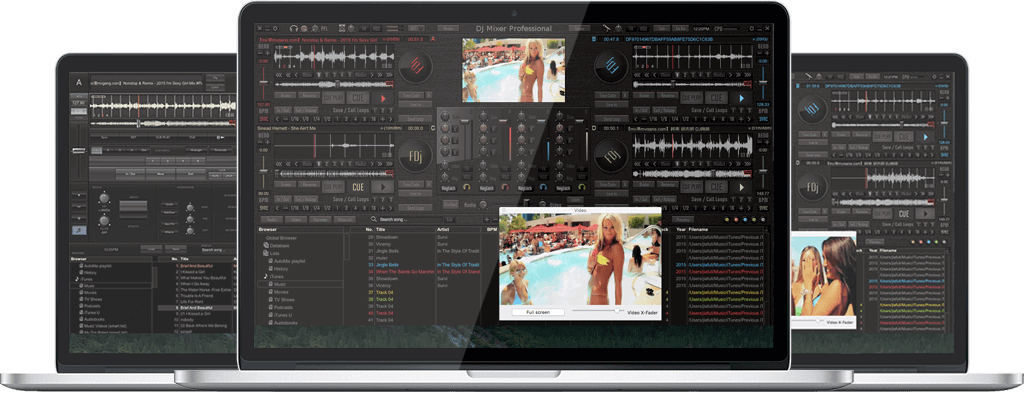
 Love the audio quality of this pro DJ software! It works great and the feature I am most happy with is video playback. After using it for a while as the demo, I have developed quite a wish list. I am seriously considering purchasing this DJ software, and making it part of my band's live performances.
The V.91.3 version, along with its popular predecessor V.91.2, remains a go-to release for many users due to its stability and robust feature set. Here are the main functions:
Dumpper relies heavily on the specific chipset of your computer’s wireless network card. Some modern Intel or Realtek network cards do not allow the raw packet injection or WPS manipulation required by Dumpper, meaning the tool may fail to scan or connect. Legal and Ethical Considerations
Since Dumpper is portable, "installation" is essentially extracting the files to a folder. However, to unlock its full potential, you need two additional components:
: Administrative privileges are usually required to interact with wireless hardware.
: Ensure you are downloading from a reputable source, as unofficial mirrors may contain bundled malware or outdated files. Ethical and Legal Considerations Dumpper V.91.3 Download
Version 91.3 includes minor bug fixes and updated PIN databases compared to older versions. Technical Prerequisites
Allows users to view, back up, and manage saved Wi-Fi profiles and passwords on the host Windows machine.
Before you proceed with the , it is important to understand the following:
Ultimately, the only ethical and legal use for Dumpper is to test the security of wireless network. Using it or any similar tool to access a network without explicit permission is illegal in most jurisdictions. If you are considering it for its stated purpose of auditing your own network's defenses, you will find its capabilities to be outdated and generally ineffective against modern routers. For any other purpose, you will likely be exposing your system to the risks of third-party download sites with little to no reward. Legal and Ethical Considerations Since Dumpper is portable,
Displays detailed information about nearby access points, including signal strength, MAC addresses, channel usage, and encryption types.
: Often requires the JumpStart application to properly execute WPS-related functions. Downloading Dumpper V.91.3
Many antivirus programs flags Dumpper as a "HackTool" or "Potentially Unwanted Application" (PUA) simply because of its capabilities. This creates a dangerous scenario: users are conditioned to disable their antivirus software or ignore warnings to run the program, completely exposing their operating system to actual malware hidden inside the download. 3. Obsolescence and Incompatibility
Here are some of the key features you can expect from Dumpper V.91.3: Ethical and Legal Considerations Version 91
Right-click on the Dumpper.exe file and select . This grants the software the necessary permissions to interact directly with your computer's wireless network interface card (NIC). Step 3: Scan for Networks
The is highly sought after by users looking for the latest, most stable version of this, free, and portable Windows-based utility designed to analyze and test Wi-Fi network security. What is Dumpper V.91.3?
: Move to the 'Wps' tab. Select "All networks" and scan again to see available WPS pins. : If a vulnerability is found, use the Start JumpStart button and enter the identified PIN to test the connection. step-by-step installation guide for JumpStart and WinPcap to get Dumpper running? Download Dumpper v.91.2.rar (Dumpper) - SourceForge
Before downloading or running Dumpper, your system must meet specific software and hardware requirements to function correctly. Software Requirements
Dumpper works by scanning nearby Wi-Fi networks and providing information on their susceptibility to known vulnerabilities. It is crucial to understand that Dumpper is a diagnostic tool, and, like other similar tools found on SourceForge, it is intended for educational purposes and auditing your own network. Key Features of Dumpper V.91.3